React Server Components Explained: How Server and Client Components Work in Next.js 16
Learn how React Server Components and Client Components work in Next.js 16. Understand rendering, data fetching, "use client", performance, architecture, and best practices.
By Harsh Thummar 10–12 min read
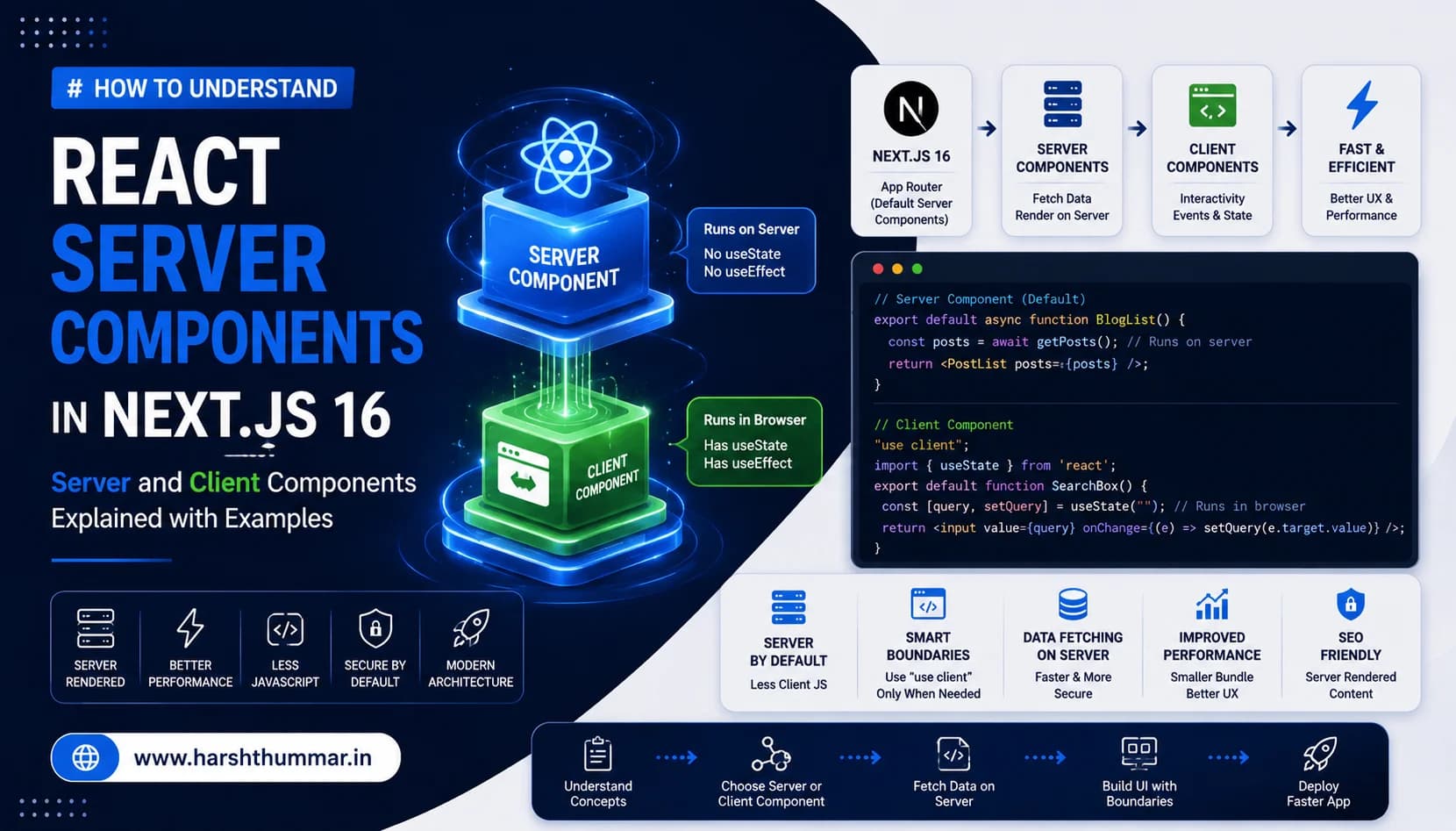
If you've worked with React for a while, you've probably used components like:
function UserCard() {
  return <div>User Profile</div>;
}
Traditionally, developers mostly thought about React components as code that runs in the browser.
Modern Next.js changes this model.
With the App Router, Server Components are the default, while Client Components are introduced when you need browser-side interactivity. This creates a clear boundary between server-side and client-side code.
This architecture can make applications:
- Faster initial page loads with streaming HTML
- Easier to scale across complex data models
- Smaller JavaScript bundles sent to the browser
- Better organized separation of concerns
- More efficient for direct database queries and data fetching
If you are comparing traditional client-side rendering with full-stack frameworks, read our guide on React vs Next.js.
But it also creates an important architectural question:
When should a component run on the server and when should it run in the browser?
In this guide, we will explore React Server Components (RSC), Client Components, the "use client" directive, data fetching patterns, component boundaries, performance impacts, common mistakes, and practical Next.js 16 architecture.
What Are React Server Components?
React Server Components are React components that execute and render exclusively on the server rather than being shipped as normal interactive JavaScript to the browser.
Traditional Client-Heavy React Flow
Browser → Download JavaScript Bundle → React Mounts & Executes → Fetch Data via API → Render UIModern Next.js Server Components Flow
Browser Request → Next.js Server → Fetch Data Directly → Render Server Components → Stream HTML + RSC Payload → Browser Displays UIThe critical benefit is that server-side computation, dependencies, and data-fetching logic do not become client-side JavaScript.
Next.js uses Server Components by default throughout the App Router.
Server Components vs Client Components
The easiest way to understand the architecture is to compare their capabilities and constraints:
- Runs on server : Server Component (✅ Yes) | Client Component (⚠️ Partly / Prerendered)
- Runs in browser : Server Component (❌ No) | Client Component (✅ Yes)
- React Hooks (useState, useReducer) : Server Component (❌ No) | Client Component (✅ Yes)
- Lifecycle Effects (useEffect, useLayoutEffect) : Server Component (❌ No) | Client Component (✅ Yes)
- Browser APIs (window, localStorage, navigator) : Server Component (❌ No) | Client Component (✅ Yes)
- Event Handlers (onClick, onChange, onSubmit) : Server Component (❌ No) | Client Component (✅ Yes)
- Direct Database & ORM Access : Server Component (✅ Server-side) | Client Component (❌ No)
- Environment Secrets & Private API Keys : Server Component (✅ Protected) | Client Component (❌ Never Expose)
- Interactive UI State & Animations : Server Component (❌ Static output) | Client Component (✅ Full interactivity)
The fundamental architectural principle is:
Server Components are for server-side work and data. Client Components are for browser-side interaction.
Why Did React Introduce Server Components?
Modern websites often don't need every component on a page to be interactive.
Consider a typical blog post or article page:
Blog Page
 ├── Header
 ├── Navigation
 ├── Blog Content
 ├── Author Information
 ├── Related Articles
 ├── Comments
 └── Like Button
Does every single part need client-side JavaScript?
Probably not. The header, article content, markdown renderer, and author information can be rendered entirely on the server.
Only components requiring user interaction:
- Like Button (state & click handler)
- Interactive Search Input (live filtering)
- Newsletter Subscription Form (form state & validation)
Instead of making the entire page a Client Component, you keep the page shell on the server and only hydrate small interactive leaves.
Server Components Are the Default
In the Next.js App Router, you can simply write:
export default function BlogPage() {
  return (
    <main>
      <h1>My Developer Blog</h1>
      <p>Welcome to my software engineering blog.</p>
    </main>
  );
}
You do not need to specify "use client". This component runs on the server by default.
This default behavior is one of the fundamental differences between modern Next.js App Router development and older React Single Page Application (SPA) patterns.
When Should You Use a Client Component?
You need a Client Component when your component requires browser-side APIs, interactive state, or event listeners.
For example, an interactive counter or reaction button:
"use client";

import { useState } from "react";

export default function Counter() {
  const [count, setCount] = useState(0);

  return (
    <button
      onClick={() => setCount(count + 1)}
      className="px-4 py-2 bg-blue-600 text-white rounded-lg font-semibold hover:bg-blue-700 transition-colors"
    >
      Count: {count}
    </button>
  );
}
Because this component uses useState and onClick, it must run in the browser.
What Does "use client" Actually Do?
The "use client" directive does not mean "this code only runs in the browser." Instead, it creates a boundary between the server-only component tree and the client-hydrated component module graph.
"use client";

import { useState } from "react";

export default function SearchBox() {
  const [query, setQuery] = useState("");

  return (
    <input
      type="text"
      value={query}
      onChange={(e) => setQuery(e.target.value)}
      placeholder="Search articles..."
      className="border rounded-lg px-3 py-2 bg-[#0A0D12] text-white"
    />
  );
}
This directive tells the Next.js compiler (Turbopack) that this module and all of its imported children belong to the client bundle.
That is why you should not automatically place "use client" at the top of every file.
A Common Architecture Mistake
Many developers transitioning from classic React SPAs make this mistake:
"use client";

// ❌ Turning the whole page into a client component
export default function BlogPage() {
  const [posts, setPosts] = useState([]);

  useEffect(() => {
    fetch("/api/posts").then(res => res.json()).then(setPosts);
  }, []);

  return (
    <main>
      <Header />
      <SearchBox />
      <PostList posts={posts} />
      <Footer />
    </main>
  );
}
When you place "use client" at the root of a page, everything beneath it becomes bundled and downloaded as client JavaScript.
The Correct Pattern: Server Shell with Scoped Client Leaves
Keep the page server-side and isolate only the interactive widget:
// app/blog/page.tsx (Server Component)
import SearchBox from "./SearchBox";
import PostList from "./PostList";
import { getPosts } from "@/lib/posts";

export default async function BlogPage() {
  // Server-side direct data fetch
  const posts = await getPosts();

  return (
    <main>
      <h1>My Developer Blog</h1>
      <SearchBox />
      <PostList posts={posts} />
    </main>
  );
}
And in your client widget:
// components/SearchBox.tsx (Client Component)
"use client";

import { useState } from "react";

export default function SearchBox() {
  const [query, setQuery] = useState("");

  return (
    <input
      value={query}
      onChange={(e) => setQuery(e.target.value)}
      placeholder="Search articles..."
    />
  );
}
Now your component hierarchy is clean and optimized:
BlogPage (Server Component)
 ├── Static Header & SEO (Server)
 ├── SearchBox (Client Component Island)
 └── PostList (Server Component)
Data Fetching with Server Components
One of the biggest advantages of Server Components is direct, asynchronous data fetching without boilerplate useEffect hooks.
export default async function ProjectsPage() {
  const response = await fetch("https://api.example.com/projects", {
    next: { revalidate: 3600 }, // Cache for 1 hour
  });

  const projects = await response.json();

  return (
    <main className="container mx-auto py-8">
      <h1 className="text-3xl font-bold mb-6">Featured Projects</h1>
      <div className="grid grid-cols-1 md:grid-cols-2 gap-6">
        {projects.map((project: { id: string; name: string; desc: string }) => (
          <article key={project.id} className="p-4 border rounded-xl">
            <h2 className="text-xl font-bold">{project.name}</h2>
            <p className="text-gray-400">{project.desc}</p>
          </article>
        ))}
      </div>
    </main>
  );
}
The component performs asynchronous operations on the server before sending rendered HTML to the client.
Direct Database Access
A Server Component can interact directly with your database through server-side libraries (Prisma, Mongoose, Drizzle, SQL).
import { db } from "@/lib/db";

export default async function ProjectsPage() {
  // Direct database query on the server — no internal API route needed
  const projects = await db.project.findMany({
    orderBy: { createdAt: "desc" },
  });

  return (
    <div>
      {projects.map((project) => (
        <h2 key={project.id}>{project.name}</h2>
      ))}
    </div>
  );
}
This eliminates the overhead of creating redundant internal REST API endpoints just to fetch data for your own UI.
Server Components and Environment Secrets
In full-stack applications, protecting database credentials and private API keys is critical.
DATABASE_URL="mongodb+srv://admin:super-secret@cluster.mongodb.net/prod"
STRIPE_SECRET_KEY="sk_live_123456789"
AI_API_KEY="sk-proj-987654321"
You should never expose these environment variables to the browser.
A Server Component can securely use:
import { db } from "@/lib/db";

export default async function AdminDashboard() {
  // Secure server execution: DATABASE_URL is never exposed to browser
  const users = await db.user.findMany();

  return <UserTable data={users} />;
}
Private environment variables stay strictly on the server, making your application inherently more secure.
How Client Components Receive Data
A Server Component can pass serializable props down to a Client Component:
// app/blog/[slug]/page.tsx (Server Component)
import LikeButton from "@/components/LikeButton";
import { getPostBySlug } from "@/lib/blog";

export default async function BlogPostPage({ params }: { params: { slug: string } }) {
  const post = await getPostBySlug(params.slug);

  return (
    <article className="max-w-3xl mx-auto py-10">
      <h1 className="text-4xl font-bold">{post.title}</h1>
      <p className="mt-4">{post.content}</p>

      {/* Passing server data to client component */}
      <LikeButton postId={post.id} initialLikes={post.likes} />
    </article>
  );
}
Client Component implementation:
// components/LikeButton.tsx (Client Component)
"use client";

import { useState } from "react";
import { Heart } from "lucide-react";

export default function LikeButton({
  postId,
  initialLikes,
}: {
  postId: string;
  initialLikes: number;
}) {
  const [likes, setLikes] = useState(initialLikes);
  const [liked, setLiked] = useState(false);

  const handleLike = async () => {
    setLiked(!liked);
    setLikes(liked ? likes - 1 : likes + 1);
    await fetch(`/api/posts/${postId}/like`, { method: "POST" });
  };

  return (
    <button
      onClick={handleLike}
      className="flex items-center gap-2 px-4 py-2 bg-blue-900/30 text-blue-400 rounded-lg"
    >
      <Heart className={liked ? "fill-blue-400" : ""} />
      <span>{likes}</span>
    </button>
  );
}
The server owns the data. The client owns the user interaction.
Think in Terms of Component Boundaries
When architecting a Next.js application, don't ask:
"Should this whole page be client-side?"
Instead ask:
"Which exact subcomponent requires browser interactivity?"
Real-World Example: SaaS Dashboard Architecture
Dashboard Layout (Server)
├── Sidebar Navigation (Server)
├── Header & Breadcrumbs (Server)
├── Summary Metrics Cards (Server)
├── Interactive Revenue Chart (Client Island)
├── Customers Table (Server)
├── Table Search & Pagination (Client Island)
└── Footer (Server)
This mental model keeps the vast majority of your UI lightweight and fast.
Server Components and Performance Optimization
Server Components directly reduce the amount of JavaScript that needs to be downloaded, parsed, and executed on mobile devices and desktop browsers.
More Server Work → Less Client JavaScript → Faster Download → Faster CPU Parsing → Superior Core Web VitalsFor foundational runtime performance, check our deep-dive on JavaScript performance optimization.
However, Server Components alone are not a silver bullet. To achieve peak speeds, you should combine them with:
- Optimized database indexing and minimal payloads
- Next.js image optimization (next/image)
- Next.js 16 caching strategies (use cache, cacheLife)
- Code splitting and dynamic imports
For comprehensive techniques on speeding up your site, review our guide to Next.js performance optimization.
Server Components and SEO Benefits
Search engines and AI crawlers prefer fast, pre-rendered semantic HTML.
Server Components render your content into clean HTML on the server before sending it over the network. Crawlers immediately receive full headings, text, and metadata without needing to execute complex client-side JavaScript bundles.
This architecture is ideal for:
- Technical blogs and engineering articles
- Documentation hubs
- E-commerce product catalogs
- Portfolio case studies and project breakdowns
To discover more strategies on rankings and technical crawlers, see our guide on React SEO and performance.
Real-World Portfolio Architecture
For a modern developer portfolio like this website, an optimal Server/Client component architecture looks like:
Portfolio Application
│
├── Navbar & Layout          Server Component
├── Hero Section             Server Component
├── About Section            Server Component
├── Skills Grid              Server Component
├── Case Studies List        Server Component
├── Case Study Filter        Client Component
├── Blog Posts Grid          Server Component
├── Interactive Search       Client Component
├── Contact Form             Client Component (Zod validation & actions)
└── Footer                   Server Component
AI Agent & Full-Stack Application Architecture
If you are building AI-powered web applications or autonomous agents as covered in our guide on AI agents with Next.js, the hybrid Server/Client pattern is essential:
AI Application Architecture
│
├── Chat Page Shell          Server Component
├── Conversation History     Server Component (loads from DB)
├── Streaming Message List   Client Component (real-time stream)
├── Prompt Input Box         Client Component (state & keyboard events)
├── Tool Execution Engine    Server-side (Node.js runtime & secrets)
├── Vector Database          Server-side (Pinecone / MongoDB)
└── LLM Provider API         Server-side (OpenAI / Anthropic / Gemini)
The React Server Component (RSC) Payload
Behind the scenes, when Next.js renders Server Components, it produces a compact binary/JSON format called the RSC Payload.
The RSC payload contains:
- The rendered HTML-like structure of Server Components.
- Placeholders where Client Components must be mounted.
- Props passed from Server Components to Client Components.
Next.js Server → Render Server Components → Stream HTML + RSC Payload → Browser Renders HTML → Hydrate Client ComponentsBecause the server outputs the RSC payload, the browser never has to download the source code of your server dependencies (such as Markdown parsers, date formatting libraries, or database drivers).
6 Common Server Component Mistakes to Avoid
Mistake 1: Adding "use client" to Page Roots
Only add "use client" to small leaf components that require interactivity.
Mistake 2: Using useEffect for Initial Data Fetching
Instead of useEffect and client-side fetch, fetch data directly inside async Server Components.
Mistake 3: Passing Non-Serializable Props
Props passed from Server Components to Client Components must be serializable (JSON-compatible). You cannot pass functions or class instances across the boundary.
Mistake 4: Exposing Environment Secrets
Never prefix private API keys or database URLs with NEXT_PUBLIC_.
Mistake 5: Making Interactive UI Libraries Server Components
Components that rely on DOM events, browser window, or animations (such as Framer Motion) must reside within Client Component boundaries.
Mistake 6: Fetching Redundant Data in Client Components
Pass the exact slice of data needed from the Server Component rather than re-fetching the entire dataset on the client.
Best Practices Checklist
- Start with Server Components : Keep every new component on the server by default.
- Keep Client Boundaries Minimal : Push "use client" down to the smallest interactive leaves.
- Keep Secrets Server-Side : Protect all API tokens and database connections.
- Co-locate Data Fetching : Fetch data inside the Server Component where it is rendered.
- Pass Lean Props : Send only the necessary fields to Client Components.
- Leverage Streaming & Suspense : Wrap heavy Server Components in React Suspense boundaries for instant loading states.
Related Guides & Case Studies
- Next.js 16 Performance Optimization →15 techniques to achieve perfect Core Web Vitals.
- How to Build an AI Agent with Next.js 16 and React →Production AI architecture and tool calling.
- JavaScript Performance Optimization Techniques →10 essential techniques for high-speed web apps.
- How to Make a React Website SEO-Friendly →Complete technical SEO guide for React & Next.js.
- React vs Next.js: Which Should You Choose? →Comprehensive framework comparison.
- NutriLeft Case Study →Next.js full-stack platform with sub-90ms query performance.
Frequently Asked Questions
What are React Server Components?
React Server Components are React components that render exclusively on the server and do not send their component code to the browser, reducing bundle size and improving initial page speed.
Are Server Components the default in Next.js?
Yes. In the Next.js App Router, all components inside the app/ directory are Server Components by default unless marked with "use client".
What does "use client" mean?
It marks a component module boundary, signaling to Next.js that the component and its children can use browser APIs, React state (useState), and lifecycle hooks (useEffect).
Can Server Components use useState or useEffect?
No. Interactive hooks require a browser environment and can only be used inside Client Components.
Can Server Components access databases directly?
Yes. Server Components run in Node.js or Edge runtimes and can query databases directly using Prisma, Mongoose, Drizzle, or native drivers without exposing credentials.
Are Server Components faster than Client Components?
Server Components can significantly improve loading speed and Core Web Vitals by eliminating large JavaScript bundles and fetching data directly on high-speed server networks.
Can Server Components and Client Components be used together?
Yes. Modern Next.js applications are designed as hybrid architectures where Server Components form the structural shell and Client Components provide interactive islands.
Conclusion
React Server Components represent a major evolution in how we architect modern web applications.
Instead of running everything in the client browser, you divide your application into Server Work (data fetching, database access, SEO rendering, and security) and Client Interaction (local state, event handlers, and rich UI feedback).
When combined with Next.js performance optimization and JavaScript performance optimization, Server Components empower developers to build ultra-fast, secure, and easily maintainable web applications.